
VisionShare series
Air series - Versatile Wireless Applications


Digital Signage
& Broadcast System
Ideal for schools, government facilities and corporate lobbies, enables dynamic content delivery for:
-
Welcome messages and event announcements
-
Real-time information boards
-
Lobby displays and promotional content


Wireless Presentation
& Video Conference
Designed for internal meetings, video conferencing, and collaborative sessions, Air Series supports:
-
Wireless screen sharing and video transmission
-
Annotation tools and presenter control mode
-
Multi-device connectivity for seamless interaction

Smart
Interactive Projection

Perfect for classrooms, training centers, and innovation hubs, Air Series offers:
-
One-to-many and many-to-one wireless projection
-
Interactive display support for touch-enabled collaboration
-
Flexible deployment across multi-screen environments


Wireless Conferencing with Air Button
Enhanced Collaboration with Plug-and-Play Conferencing
-
Air Button for plug-and-play wireless video conferencing
-
Compatible with any USB camera for wireless camera integration
-
Support any conference system such as Zoom, Microsoft Teams, Neat...etc.
-
Support dual-band Wi-Fi for low-latency transmission
-
Optimized for hybrid meetings and remote collaboration
-
Enhanced stability in high-density network environments


Air 60


Meet the new Air series
Wireless Video Conferencing
Experience ultra-fast, cable-free collaboration with VisionShare Dual Wi-Fi 5GHz + Wi-Fi 6GHz and 4K clarity.
Meet the VisionShare
The Ultimate Wireless Integration Solution

.png)

Dual-Band WiFi 5GHz + WiFi 6GHz
VisionShare delivers seamless wireless video conferencing and stunning 4K presentations with next-gen dual WiFi5 + WiFi6. Designed for modern workspaces, it ensures fast setup, stable connectivity, and crystal-clear visuals—empowering teams to collaborate effortlessly.


VisionShare
Air Present
Unlock Wireless Projection, Anytime, Anywhere.


Any Screen, Any Devices
One-stop wireless projection solution: Compatible with AirPlay, Intel WiDi, Miracast…enabling hassle-free content mirroring for personal use.
4K UHD Resolution
VisionShare AIR series delivers ultra high definition 4K (3840x2160@30Hz) resolution with experience crystal-clear visuals and real-time responsiveness.


Moderator Mode
Centralize control of all connected devices approve, switch, or lock projections to keep meetings and presentations organized.
Unified Room Experience
Robust connectivity bridges your devices and room equipment for flawless performance.

VisionShare
Air Conference
Transform any meeting room into a high-performance collaboration space.

Unified Wireless System for Conferencing Platforms
Experience seamless collaboration with a single wireless system that works across all major conferencing platforms—including Microsoft Teams, Zoom, and Google Meet. VisionShare ensures effortless connectivity, smooth presentations, and reliable performance for any meeting environment.


Seamless integration with
AV equipment
Enjoy effortless integration with any USB conferencing device, from cameras and video bars to microphones and speakers. Creating a high-quality video conferencing experience without additional cables or software.
Call-Sharing Mode
A smarter way for multiple in-room presenters to share during a video conference.

How we solve the problem during meeting?
IIn hybrid meetings, usually only one laptop joins the video conference to avoid network overload, echo, or complicated switching. But other participants in the room may still need to present.
Call-Sharing Mode decouples content sharing from the video stream. It allows any participant in the room to project their screen to the meeting without fully joining the call.
Benefits of Call-Sharing
-
No need for everyone to join the conference → reduces network load and avoids audio feedback issues.
-
Multiple presenters can share easily without switching the video conference host.
-
Fast and wireless sharing using familiar tools (AirPlay/Miracast/WiDi).
-
Consistent experience for remote attendees—they always see the current room presentation.
-
Simple and reliable workflow, ideal for hybrid meetings and guest presentations.
How to Use?
-
Host joins the video conference
Only one participant connects their laptop to Zoom/Teams/Webex, acting as the Host.
-
Local participants share wirelessly
Anyone in the same meeting room can cast their screen to the room display using AirPlay, Miracast, or WiDi—no need to join the call.
-
Host shares the room display back into the call
When the Host long-presses the VisionShare AIR Button, the system captures the meeting-room screen and sends it to remote attendees through the Host’s video conferencing software.
** Call Sharing Mode only function with Air Butoon (Air60)
VisionShare
Air Collaborate


Designed for large training rooms, active learning spaces, and town hall meetings.
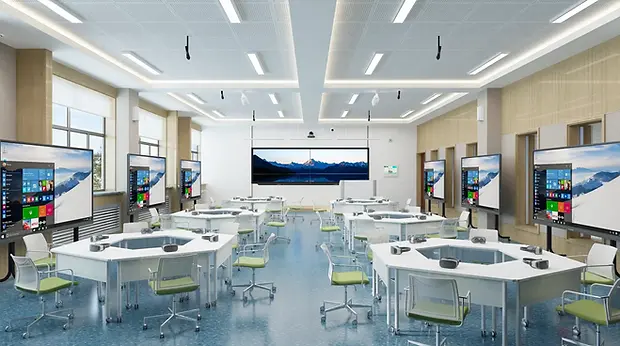

Synchronized Screen Broadcasting
• Description: Unlike standard presentation systems, Air Collaborate can wirelessly broadcast the content from the main screen to multiple auxiliary displays simultaneously.
• Benefit: Eliminates the need for expensive matrix switchers or long HDMI cabling in large venues, ensuring everyone in the back of the room sees the same content in real-time.
Advance Multi-Screen Interaction
• Description: It supports a true interactive platform where the main screen acts as a central hub, allowing for real-time annotation, content management, and control across connected displays.
• Benefit: Transforms passive presentations into active collaboration sessions, ideal for educational environments or dynamic team workshops.

Split-Screen Display
Seamless Group Collaboration: Foster teamwork by allowing multiple groups to cast their work to the big screen at once. Perfect for comparing results and facilitating group discussions.

Display Broadcasting
Instant Content Sharing: Ensure no one misses a detail. Instantly broadcast the instructor or host's screen to every student's personal device for a clearer, focused view.


